How to set a circular polarization in a waveguide port in CST

1. You need to select the number of modes as 2 in the waveguide port
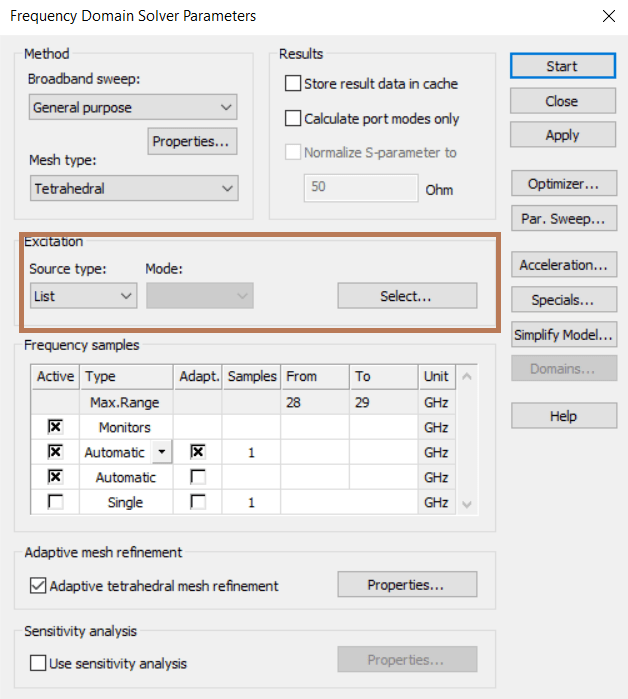
2. Then, you have to go to the ‘Setup Solver’ window. In this case I am using the Frequency Domain Solver, so I get this window. There, you have to select ‘List’ as Source Type.
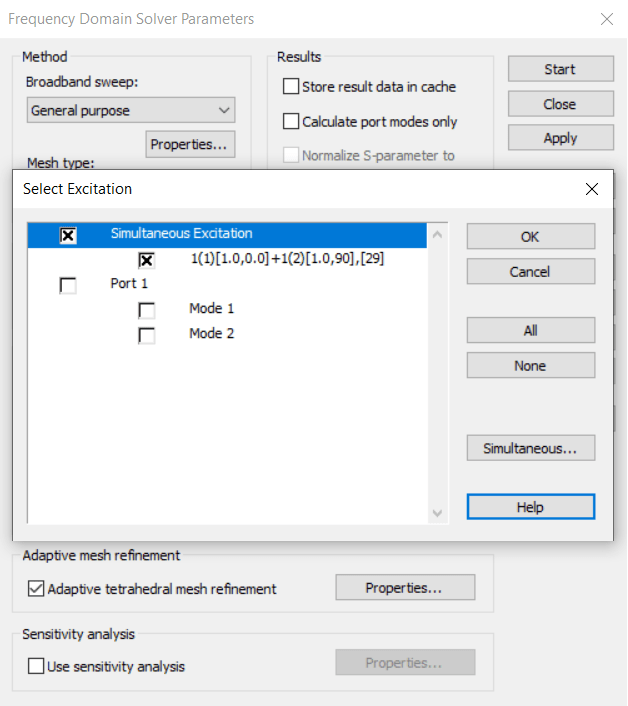
3. Afterwards, you have to click in ‘Select’ and a new window will appear. There you have to check ‘Simultaneous Excitation’ box and uncheck the other boxes.
4. Finally, you have to click in ‘Simultaneous’ and there you select the phase difference between the two modes to be excited. For a circular polarization, you must have 90°. For an elliptical polarization you can select you specific phase difference that you need.

Note that CST will automatically set up the angle between the polarizations as 90° if the waveguide port supports both polarizations. This is usually the case for a circular waveguide.


Posted

in

by

Tags:

Comments

Leave a comment